Leaderboard
Popular Content
Showing content with the highest reputation on 09/29/2016 in Posts
-

clmustafic review reply and discussion
BronxWench reacted to CL Mustafic for a topic
Thanks ladies! I’m finding myself in a tough spot now though. I forgot my mom is social media stalking me and she called me to find out what this new book is about. Me: Um… a hitman that uh… does stuff? Her: Oh, sounds like something Ron (my brother) would like. You know he likes those thriller type books. And something about politics too, right? The name is Backdoor Politics? Me: Uh… I don’t have the balls yet to tell her what it’s really about. I may have to tell her it’s only being published in Swahili or something.1 point -

clmustafic review reply and discussion
BronxWench reacted to pippychick for a topic
Fantastic news! Congratulations, CL I really, really, love that story.1 point -

Link to Archive
BronxWench reacted to DemonGoddess for a topic
The archives I referred to were the SHOUTBOX archive files. That was how I understood the question. I can do one of two things here, create a top menu item which links directly, or refine it further to include the subdomains in a drop down. I’m leaning towards the drop down.1 point -

clmustafic review reply and discussion
CL Mustafic reacted to BronxWench for a topic
I can’t wait to add it to the Kindle!1 point -
clmustafic review reply and discussion
BronxWench reacted to CL Mustafic for a topic
So I just signed a contract to publish Backdoor Politics which of course means I’ll be removing it from AFF shortly. Fair warning if you are reading the story, you have about 22 hours to finish it. I plan to take it down tomorrow morning (that’s my tomorrow morning and I’m on CET). Thanks to everyone who read the story (including at least 2 people I know who didn’t enjoy it, you know who you are) and a special big thanks to those of you who reviewed it! I’ll make sure I post a link in the Great Wall of… thread as to where you can purchase the book once it comes out. Now, back to your regularly scheduled programming. CL1 point -

Link to Archive
BronxWench reacted to Desiderius Price for a topic
I'm not worried, I know I'm crazy.1 point -

Link to Archive
BronxWench reacted to DirtyAngel for a topic
ok, I was worried I was going crazy1 point -

Flame review
BronxWench reacted to Melrick for a topic
Thanks for reporting. The archive crew will get onto it as soon as they can.1 point -
How to edit the story info, including disclaimers and content tags
Arian-Sinclair reacted to Melrick for a topic
How do I edit my story info? Do you want to rewrite a story summary? Fix up the disclaimer? Perhaps add some more content tags? There's an easy way to do it. Just follow these steps. The processes are very similar to adding a new story. Ensure you're logged in to the archive. Then navigate to the Story Manager in the desired archive. A new screen will load showing you all the stories you've uploaded to that archive. Find the story that you wish to edit, and click the green EDIT link to the right: This brings you to the same screen as when you created the story. You can now edit your story information, including the title, the disclaimer, the summary, and you can add tags as well. You can even, if you posted the story to the wrong sub-category, move your story around within the archive. When you are finished, click the UPDATE STORY link to save your changes.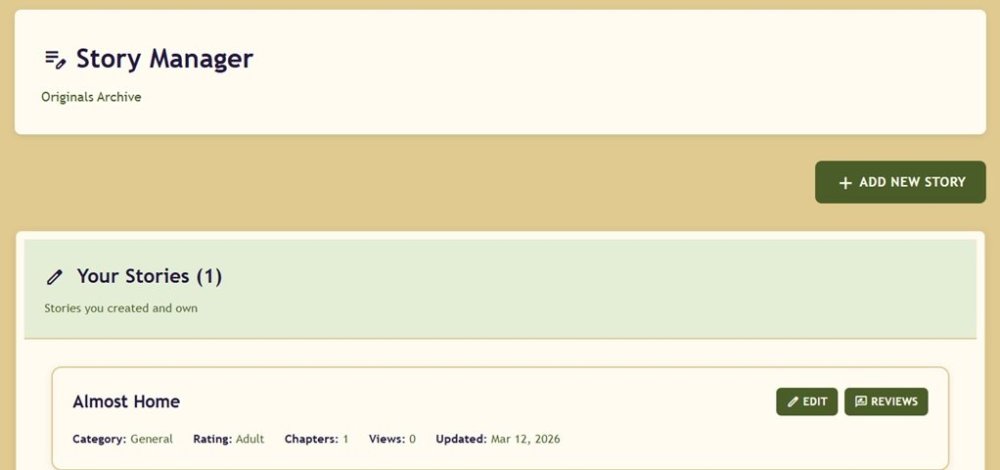 1 point