All Activity
- Past hour
-
 BronxWench reacted to a post in a topic:
Old feature return to new text editor, please?
BronxWench reacted to a post in a topic:
Old feature return to new text editor, please?
-

Old feature return to new text editor, please?
Wilde_Guess replied to Wilde_Guess's topic in Archive Tech Support
Hi, @DemonGoddess All of them, or at least the Harry Potter and the Originals archives. The image below is what I get. Thanks in advance.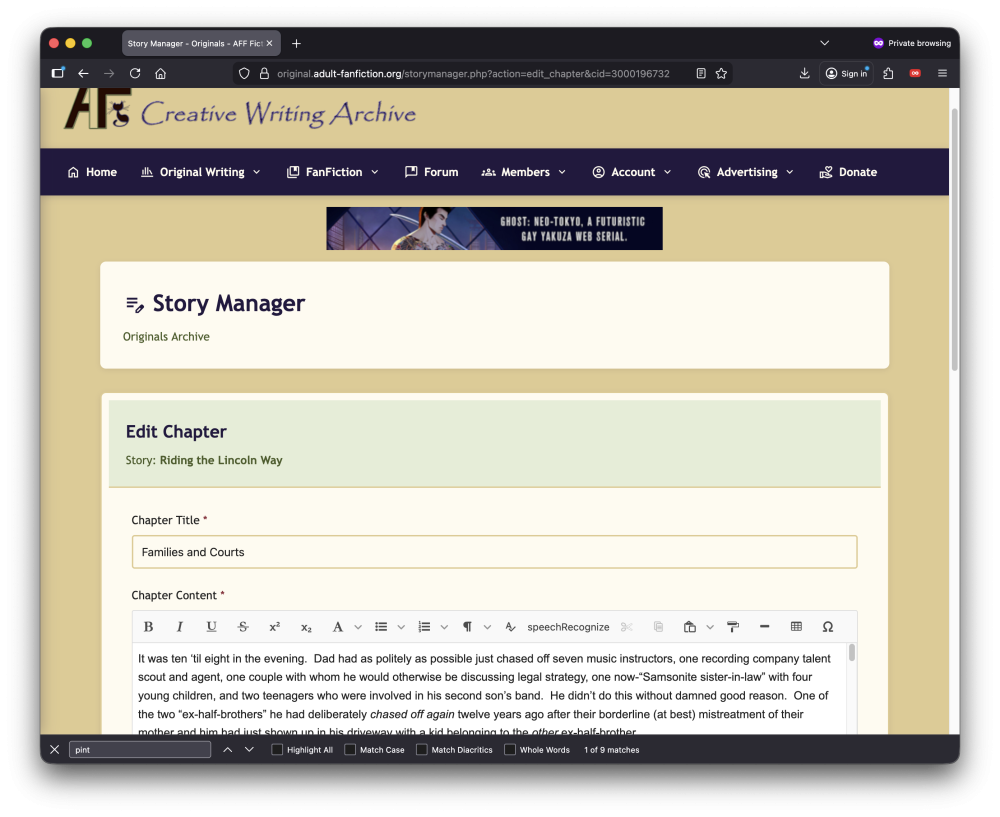
-
Yes, friends, it’s been a while since I’ve last updated this story. The story stands, as of right this moment, at 48 chapters. There is “a version” of chapters 49-52. However, they’re an “alternate reality crossover” with a Harry Potter story that is itself a crossover of this story. Say that three times fast. I’ve also received several gracious reviews. While I answered the reviewer directly, I might (should) also post the answers here. AFF now allows the archive authors to post direct links to the AFF Forum, if they choose to do so. You probably got here by clicking the button at the bottom of the chapter. If you got here by some other means, well you know now that you can click over here directly from over there. 😉 Thanks in advance for reading.
- Today
-
Yes friends, here it is! It’s a crossover of a crossover between the HP Universe and an Original Fiction. Four chapters have been posted so far. You are free (within reason) to discuss the story here and ask questions. Answers to any reviews may also be found here. Thanks in advance for reading.
-
BronxWench reacted to a post in a topic:
Is there an archive limit on chapter size?
-
BronxWench reacted to a post in a topic:
Is there an archive limit on chapter size?
-

Old feature return to new text editor, please?
DemonGoddess replied to Wilde_Guess's topic in Archive Tech Support
Which archive are you having the alignment issues with? -

Is there an archive limit on chapter size?
Desiderius Price replied to Deadman's topic in Archive Tech Support
As a follow on, yes, I did manage to finally write past that 105k/107k (depends on using FFN vs the libreoffice’s word counter) old chapter on the rewrite… became like 126 chapters or something like that. Now tackling that 91k old chapter and wondering how long that’ll end up For Repair Guy, I did experiment, overall successfully with deliberately keeping them short (around 2k) … though it’s rewrite has stalled. -
Hello, all. Prior to the last “super-upgrade,” the text editor on the archive side had a feature where you could change the alignment of the text between the default left-aligned to center-aligned, right-aligned, and “justified.” The text editor here still has that, but the one on the archive side does not. Is there any chance of getting that feature back? Thanks in advance either way.
-
Is there an archive limit on chapter size?
Wilde_Guess replied to Deadman's topic in Archive Tech Support
Hi, Deadman and all. I’m a little bit late to the game here. Just the same, I agree with everyone else here that 20k words in a multi-chapter story is a bit excessive. Sometimes, the story flow just won’t let you cut it any shorter. However, if that’s the case, then you had better have some very exciting and readable stuff. An alternative is to put more content in to the chapter, allowing you to split the now 24k chunk of prose into two 9k chapters and a 6k chapter while maintaining both story pacing and reader interest. When looking at stories as a reader, I tend to look for longer, but not “too long” chapters. As a rule of thumb, a 2k chapter is a “Reader’s Digest story of a story,” and more than 20k has me wondering if the writer has any clue about what they’re writing. In “published life,” Theodore Dreiser’s An American Tragedy has a chapter that’s barely two pages, plus multiple chapters that are practically novellas or at least novella length in their own right. Cheers! -
Wilde_Guess reacted to a post in a topic:
Is there an archive limit on chapter size?
-
Wilde_Guess reacted to a post in a topic:
Is there an archive limit on chapter size?
-
Wilde_Guess reacted to a post in a topic:
Is there an archive limit on chapter size?
-
Wilde_Guess reacted to a post in a topic:
Is there an archive limit on chapter size?
-
Wilde_Guess reacted to a post in a topic:
Is there an archive limit on chapter size?
-
Wilde_Guess reacted to a post in a topic:
Is there an archive limit on chapter size?
-
Wilde_Guess reacted to a post in a topic:
Is there an archive limit on chapter size?
-
46310
-
46309
-
If you’re trying to do this as a registered user, you may have to activate the account first. In any case, these are the steps for setting that cookie. First thing, before you proceed. DO NOT use anonymous browsing for this part. You can go back to it afterwards. Be sure to do this from the main page: https://www.adult-fanfiction.org No matter WHICH browser, you must clear cache and cookies for ALL TIME. If you are using Apple products, you must clear cache in all your devices as the products link together. After doing the clear, close and restart your browser. Finally, you need to force refresh. (Press Ctrl+F5) That should fix the issues. You should be able to proceed once you do that. If you’re getting an error about activation, go to the register link and select the drop down option of “resend activation”. Remember, major software changes generally do require this sort of action. If, after all this, you’re still experiencing issues with the age verification, in Chrome/Edge, press F12 to access the console. You’ll see the exact error being generated. Let us know what it is. If you are experiencing bugs, please post them to the bug tracker. What we will need from you are specific steps you took to get the error, and screen shots if you are able. This will help in getting everything fixed, if there are bugs.
- Yesterday
-
Y does the age verification not open after its been verified
-
 Aragoth1 joined the community
 -
46308!
-
46307!
-
 If you’re trying to do this as a registered user, you may have to activate the account first. In any case, these are the steps for setting that cookie. First thing, before you proceed. DO NOT use anonymous browsing for this part. You can go back to it afterwards. Be sure to do this from the main page: https://www.adult-fanfiction.org No matter WHICH browser, you must clear cache and cookies for ALL TIME. If you are using Apple products, you must clear cache in all your devices as the products link together. After doing the clear, close and restart your browser. Finally, you need to force refresh. (Press Ctrl+F5) That should fix the issues. You should be able to proceed once you do that. If you’re getting an error about activation, go to the register link and select the drop down option of “resend activation”. Remember, major software changes generally do require this sort of action. If, after all this, you’re still experiencing issues with the age verification, in Chrome/Edge, press F12 to access the console. You’ll see the exact error being generated. Let us know what it is. If you are experiencing bugs, please post them to the bug tracker. What we will need from you are specific steps you took to get the error, and screen shots if you are able. This will help in getting everything fixed, if there are bugs.
 -
Please fix this age thing, you’re killing this website!!!
BronxWench replied to a question in Bug Tracker
If you can give me your exact pen name, I can check to see if you're actually activated. That is often the issue, and it’s easily remedied. -
I’m even willing to do the extra step here – but it is absolutely unreasonable to expect people to delete ALL their cache and cookies. They exist for a reason, and it would be a major hussle to be logged out and reset on every single website. Now, I’m not in your shoes, but I’m betting you could fix this issue with ChatGPT or Claude in 1 afternoon. Please accept that you are killing this website with this thing. Look at how many messages with the same content are on here. This is loosing soooo many regular users. People have been looking past soo many bugs for so many years, but this is too much. And I’m not blaming you, you’re not doing this as a fulltime job, but it would be such a shame to give up this project you, and thousands and thousands of people have put in so much love and time. The way to save this is to bring out a message that you‘re gonna fix this, until date x (1 month maximum), and then actually do it. I really love your site and I’m really sad to see this.
-

I can't be able to get pass age verification to continue with this website even though I'm in my 20s
Guest posted a question in Bug Tracker
I wanted to continue with my account, but this damn website kept denying me entry every time I clicked ‘yes’ that I’m above the age of 18. -
Did you know New York actually has 12 seasons?
https://12seasons.nyc/-
Mother nature is bipolar in March...😁
-
-
46306
- Last week
-
46305
-
If you’re trying to do this as a registered user, you may have to activate the account first. In any case, these are the steps for setting that cookie. First thing, before you proceed. DO NOT use anonymous browsing for this part. You can go back to it afterwards. Be sure to do this from the main page: https://www.adult-fanfiction.org No matter WHICH browser, you must clear cache and cookies for ALL TIME. If you are using Apple products, you must clear cache in all your devices as the products link together. After doing the clear, close and restart your browser. Finally, you need to force refresh. (Press Ctrl+F5) That should fix the issues. You should be able to proceed once you do that. If you’re getting an error about activation, go to the register link and select the drop down option of “resend activation”. Remember, major software changes generally do require this sort of action. If, after all this, you’re still experiencing issues with the age verification, in Chrome/Edge, press F12 to access the console. You’ll see the exact error being generated. Let us know what it is. If you are experiencing bugs, please post them to the bug tracker. What we will need from you are specific steps you took to get the error, and screen shots if you are able. This will help in getting everything fixed, if there are bugs.
-
READ ME: Validation/Password Reset Issues
Wilde_Guess replied to BronxWench's topic in Archive Tech Support
Thanks, @BronxWench. It works as advertised, and I uploaded a chapter. -
implement this busted age verification system.
-
READ ME: Validation/Password Reset Issues
BronxWench replied to BronxWench's topic in Archive Tech Support
I’ve activated the account. It should work for you now. -
READ ME: Validation/Password Reset Issues
Wilde_Guess replied to BronxWench's topic in Archive Tech Support
Hi, @DemonGoddess. Help! I tried logging in to the Archive side a few minutes ago, and I got the dreaded “Please activate your account first” box. Thanks in advance to you or “whomever.”