All Activity
- Past hour
-
OneConverter is a comprehensive website where users can perform almost any type of conversion from one unit to another within one convenient interface. Length, weight, volume, and many other units can be converted by following three simple steps: choose a converter category, input a number, and receive the desired result right away. The user interface is minimalistic and extremely user-friendly, meaning that there are no applications to install since everything works right in the web browser. In addition to such categories as temperature and area. OneConverter offers converters for speed, power, and energy. Currency conversion can be achieved by selecting a specific pair of currencies and entering an amount. Moreover, one can find time zone converters as well as a tool that helps calculate time differences between two locations. It is not necessary to browse complicated navigation to perform a particular task since OneConverter is focused on simplicity, offering users a set of converters for different needs right away. This website will be especially useful for students, engineers who need to confirm their specifications, and even travelers. The formula and rates will be updated automatically, which can contribute to improving accuracy. OneConverter
-
 BronxWench reacted to a post in a topic:
Publishing a new story without chapters on upgraded archive?
BronxWench reacted to a post in a topic:
Publishing a new story without chapters on upgraded archive?
- Today
-
46410
-
46409
-
 And my dirty mind instantly turned this thought as a flirtation with staff via hidden stories…
 - Yesterday
-

Publishing a new story without chapters on upgraded archive?
BronxWench replied to Deadman's topic in Archive Tech Support
Yes, you can have them visible only to you and to staff, and yes, you can go into your story manager and edit that to make the story visible. -
 BronxWench reacted to a post in a topic:
Publishing a new story without chapters on upgraded archive?
BronxWench reacted to a post in a topic:
Publishing a new story without chapters on upgraded archive?
-
Here. But you will have to make a profile on the site to access it. https://www.themasque.net/wiktt/efiction/viewstory.php?sid=3018&index=1 Hope you're still looking. It's such a great fic <3
-

Publishing a new story without chapters on upgraded archive?
Deadman replied to Deadman's topic in Archive Tech Support
Well, I saw this and this is part of what I meant. I would love to create a bunch that are visible only to me and staff. I’m kinda curious if I can just change that and have it be visible to everyone later.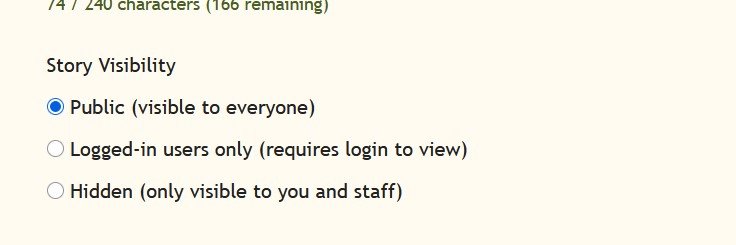
-
Deadman reacted to a post in a topic:
Publishing a new story without chapters on upgraded archive?
-
Publishing a new story without chapters on upgraded archive?
BronxWench replied to Deadman's topic in Archive Tech Support
Oh! If you can hide it via your story manager, that’s fine then! I honestly forget what is available to non-staff members anymore... -
BronxWench reacted to a post in a topic:
Publishing a new story without chapters on upgraded archive?
-
Publishing a new story without chapters on upgraded archive?
Deadman replied to Deadman's topic in Archive Tech Support
Okay, just to be clear on what I mean about placeholders, if it could be a hidden “draft” in my story manager in the correct category. If that’s not possible, that’s fine. It’s fine since I usually only publish when my piece is a few chapters deep or complete. -
Deadman reacted to a post in a topic:
Publishing a new story without chapters on upgraded archive?
-
If you’re trying to do this as a registered user, you may have to activate the account first. If you’ve already activated and set the new cookie, and you get the age verification again, you have to go the root domain and refresh the cookie. The refresh is simple: go to https://www.adult-fanfiction.org and click yes. You won’t need to clear anything to refresh the cookie. To set the cookie the first time, this is how you do it: First thing, before you proceed. DO NOT use anonymous browsing for this part. You can go back to it afterwards. Be sure to do this from the main page: https://www.adult-fanfiction.org No matter WHICH browser, you must clear cache and cookies for ALL TIME. If you are using Apple products, you must clear cache in all your devices as the products link together. After doing the clear, close and restart your browser. Finally, you need to force refresh. (Press Ctrl+F5) That should fix the issues. You should be able to proceed once you do that. If you’re getting an error about activation, go to the register link and select the drop down option of “resend activation”. Remember, major software changes generally do require this sort of action. If, after all this, you’re still experiencing issues with the age verification, in Chrome/Edge, press F12 to access the console. You’ll see the exact error being generated. Let us know what it is. If you are experiencing bugs, please post them to the bug tracker. What we will need from you are specific steps you took to get the error, and screen shots if you are able. This will help in getting everything fixed, if there are bugs.
-
Cant get in even though i. Over 18
-
46408
-
46407
-
BronxWench reacted to a post in a topic:
Publishing a new story without chapters on upgraded archive?
-
Publishing a new story without chapters on upgraded archive?
BronxWench replied to Deadman's topic in Archive Tech Support
If you create a story, even without content, it will appear in the archive. Interestingly enough, we don’t allow placeholders, so my recommendation is not to create the story until you have the first chapter ready to publish. You can create the story, check to see if it’s live, and then add the first chapter right away, though. -
So I just published my first completely new story with the upgraded archive and I noticed a difference. On the old archive, you had to publish the first chapter when you published the story. Now it seems like on the upgraded archive you don’t need to do that. My question is, can I create a placeholder for future stories that I’m not ready to publish in my story editor without it showing up on the archive? I immediately published the first chapter without thinking that I should check if the story is live. How does that work?
-
 shivermyTimbers-99 joined the community
 -
46406
-
46405
-
The final chapter of “Time’s Error” is posted! Chapter 5: Pon Farr Out
-
46404
-
46403
-
46402
-
46401
-

George Glass' Review Responses -- Original Fiction
GeorgeGlass replied to GeorgeGlass's topic in General
Re: “Anything That Moves” exceed April 8, 2026 at 12:00 AM It’s funny you should say that, because I’m working on a sequel in which that very thing happens. -
If you’re trying to do this as a registered user, you may have to activate the account first. If you’ve already activated and set the new cookie, and you get the age verification again, you have to go the root domain and refresh the cookie. The refresh is simple: go to https://www.adult-fanfiction.org and click yes. You won’t need to clear anything to refresh the cookie. To set the cookie the first time, this is how you do it: First thing, before you proceed. DO NOT use anonymous browsing for this part. You can go back to it afterwards. Be sure to do this from the main page: https://www.adult-fanfiction.org No matter WHICH browser, you must clear cache and cookies for ALL TIME. If you are using Apple products, you must clear cache in all your devices as the products link together. After doing the clear, close and restart your browser. Finally, you need to force refresh. (Press Ctrl+F5) That should fix the issues. You should be able to proceed once you do that. If you’re getting an error about activation, go to the register link and select the drop down option of “resend activation”. Remember, major software changes generally do require this sort of action. If, after all this, you’re still experiencing issues with the age verification, in Chrome/Edge, press F12 to access the console. You’ll see the exact error being generated. Let us know what it is. If you are experiencing bugs, please post them to the bug tracker. What we will need from you are specific steps you took to get the error, and screen shots if you are able. This will help in getting everything fixed, if there are bugs.
-
Website does not allow access for +18 years button. Please fix, or provide a solution to circumvent the issue.